Oct 18, 2026
I tested best free Instagram caption generators
People already co-write with language models. I gave four free Instagram caption tools the same brief and looked at what actually shows before More.
The blank page is already optional
Fewer people write text from the first word to the last. That includes ad copy, and it includes novels that are still sold as one author’s work while quietly co-written with a language model. A call to action generated by an AI can also be more persuasive than one a person sweated over. A draft study from the University of Zurich reported that undisclosed AI comments on Reddit’s r/ChangeMyView changed minds three to six times more often than human comments.
An Instagram caption is a strange place to insist on starting from an empty box, unless the handcrafted line is the point of the work. If you are not protecting a voice the way a novelist does, the useful question is smaller: Did you supply the idea, the tone, and the sentence you actually want someone to read?
A free generator gets you there faster. It can also be sharper than the caption you would have written on a Tuesday night. It still needs a brief. I gave the same prompt to a few tools that show up at the top of a search, alongside a newer tool called Askify, to see how they compare in practice.
The same brief
The line I typed was:
humain vs ai written text
I left the spelling as it was. Every tool answered in English anyway. Where the form allowed it, I asked for a fun or humorous tone, a short caption, and about five hashtags.
Pallyy
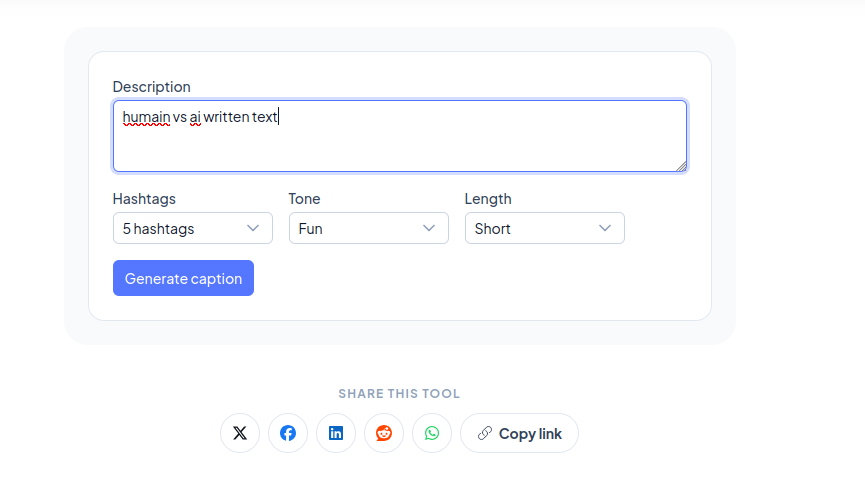
Pallyy takes a description. I set the tone to Fun, the length to Short, and the hashtags to 5. The tone menu has 12 choices, and you have to pick one.
When it comes to writing, who does it better: humans or AI? 🤔 While we pour our souls into every word, AI churns out text faster than you can say "artificial intelligence"! 😂 Let the battle begin! 🥊 #HumanVsAI #WritingWars #CreativityChallenge #TechVsTalent #WordplayFun
273 characters. One line, five hashtags, ready to copy.
OneUp
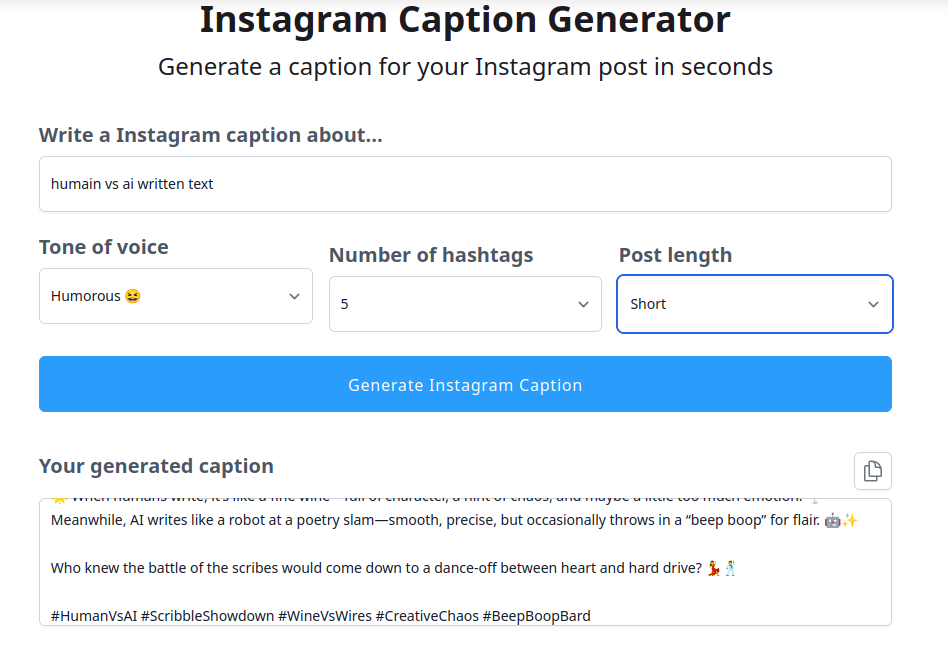
OneUp also starts from a description. I used Humorous, Short, and 5 hashtags. The form offers 12 tones, a length of Short, Medium, or Long, and up to 30 hashtags.
🌟 When humans write, it’s like a fine wine—full of character, a hint of chaos, and maybe a little too much emotion. 🍷 Meanwhile, AI writes like a robot at a poetry slam—smooth, precise, but occasionally throws in a “beep boop” for flair. 🤖✨
Who knew the battle of the scribes would come down to a dance-off between heart and hard drive? 💃🕺
#HumanVsAI #ScribbleShowdown #WineVsWires #CreativeChaos #BeepBoopBard
419 characters. This is the most playful of the three, and the hashtags match the joke. There is a copy button. There is no character counter, and the caption is not edited on the page.
Ahrefs
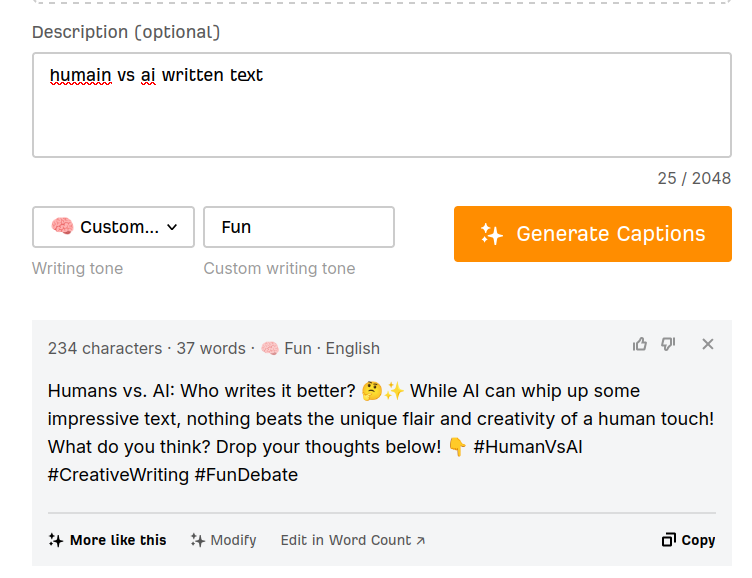
Ahrefs was the most complete of the established options, because you can start from a photo as well as a description. The description box shows its own counter out of 2,048 characters. There are 16 tones plus a custom one, a language setting, a choice of 1, 3, or 5 variants, and separate options for hashtags and emojis. I used a custom tone called Fun.
Humans vs. AI: Who writes it better? 🤔✨ While AI can whip up some impressive text, nothing beats the unique flair and creativity of a human touch! What do you think? Drop your thoughts below! 👇 #HumanVsAI #CreativeWriting #FunDebate
Their counter read 234 characters and 37 words. I did not expect that counter on a free tool, or the buttons next to it: More like this, Modify, and Edit in Word Count.
Askify
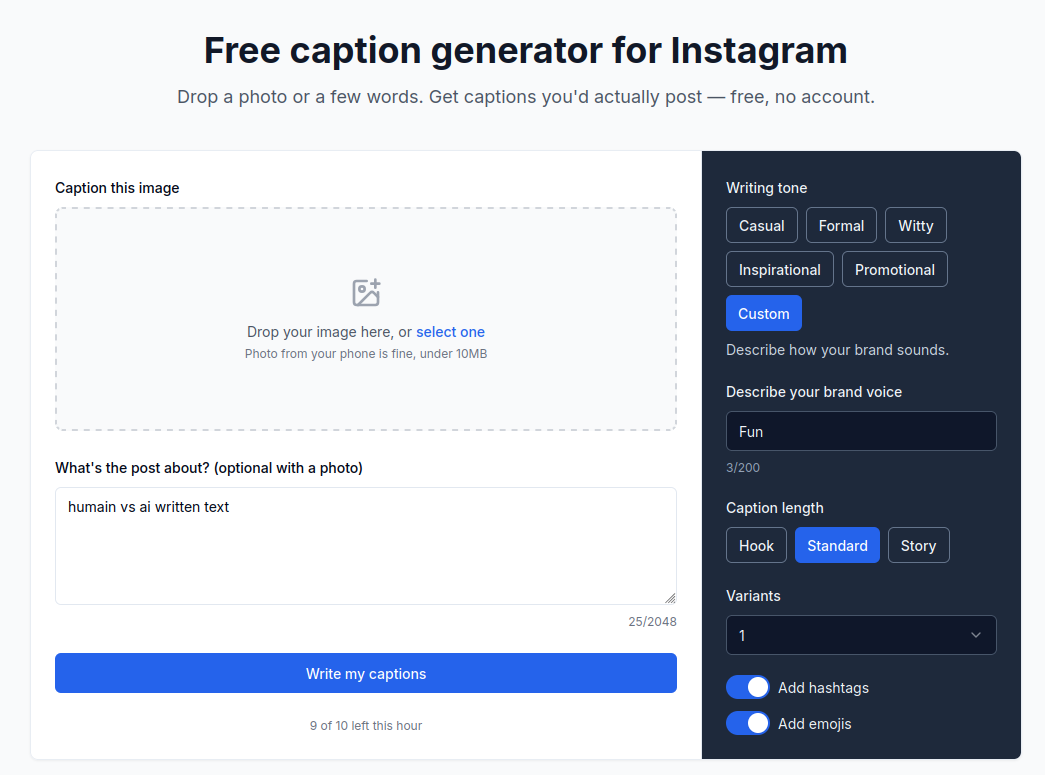
Askify approaches the layout problem with a workflow built specifically for social media realities.
You can pick a tone—Casual, Formal, Witty, Inspirational, or Promotional—or describe your own. Hashtags and emojis are quick toggle switches. Length can be set to Hook, Standard, or Story. Setting it to "Hook" aims for roughly 125 characters, designed specifically to sit above Instagram’s "More" fold. You can ask for 1, 3, or 5 variants. Write the brief in the language you want back, and the caption follows it. If you only upload a photo, the caption defaults to your choice of English, French, Spanish, or Russian.
From the same brief, with hashtags and emojis turned on:
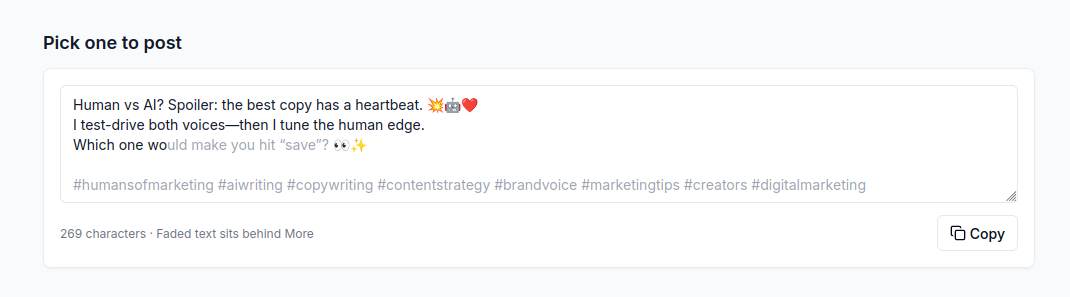
The standout difference here is what happens after generation. You edit the caption directly on the page, where a live counter sits underneath. The first 125 characters stay fully visible, while everything after that fades dynamically with a visual indicator showing exactly what text gets pushed behind Instagram's "More" tag.
What people actually read
Instagram allows 2,200 characters. In the feed, people see about the first 125, and the rest waits behind More. A lot of scrolling never gets that tap. Sometimes that is laziness. Sometimes it is a wish to stay off the algorithm’s radar. Either way, a caption whose main point starts at character 140 is a caption most people will simply miss.
Here is the visible portion of each generator's output, cut right at the 125-character mark:
- Pallyy: “When it comes to writing, who does it better: humans or AI? 🤔 While we pour our souls into every word, AI churns out text fa”
- OneUp: “🌟 When humans write, it’s like a fine wine—full of character, a hint of chaos, and maybe a little too much emotion. 🍷 Meanw”
- Ahrefs: “Humans vs. AI: Who writes it better? 🤔✨ While AI can whip up some impressive text, nothing beats the unique flair and creati”
- Askify: the first two lines, and then “Which one wo”
Pallyy’s own guide tells you to judge a caption on the first sentence, because the feed hides the rest after about 125 characters. Yet the caption it generated is one continuous 273-character line, sliced awkwardly at “fa”. OneUp breaks mid-word at “Meanw”. Ahrefs cuts off at “creati”.
Askify performs noticeably better out of the box, though formatting still matters. Its first two lines end at character 113, so they remain fully visible in the feed. The question, “Which one would make you hit save?”, starts on the next line and just spills over the threshold.
If that closing question is the main call to action, having an interface that highlights the cutoff point makes it obvious: you can immediately trim the lines above it until the question mark sits before the visual fade. Hashtags can safely live in the hidden area below; your core message cannot.
Having a real-time counter combined with a visual preview of the "fold" turns caption editing from guesswork into a precise step.
Side by side
All four tools are free, and none required creating an account to run these tests.
| Feature | Pallyy | OneUp | Ahrefs | Askify |
|---|---|---|---|---|
| Input | A description | A description | Photo, description, or both | Photo, description, or both |
| Tone | 12 preset tones (Selected: Fun) | 12 preset tones (Selected: Humorous) | 16 preset tones or custom (Selected: Fun) | Casual, Formal, Witty, Inspirational, Promotional, or custom |
| Length | Length menu (Selected: Short) | Short, Medium, or Long (Selected: Short) | No length menu prior to writing; modify options available after | Hook (~125 chars), Standard, or Story. Max cap: 2,200 |
| Hashtags | 5, 10, or 15 | Up to 30 | On/Off toggle | On/Off toggle (adds 3–8) |
| Emojis | Included automatically | Included automatically | On/Off toggle | On/Off toggle |
| Language | Defaults based on input | Defaults based on input | Manual language selector | Follows brief language; photo-only defaults to EN, FR, ES, or RU |
| Variants | 1 caption | 1 caption | 1, 3, or 5 (plus "More like this") | 1, 3, or 5 |
| Post-generation | Copy to clipboard | Copy to clipboard | Word/char counter, Modify, Edit in Word Count | Live on-page editor with visual "More" fold preview and character counter |
Most AI caption generators produce fairly similar raw copy. The practical distinction comes down to workflow: whether a tool lets you preview and adjust for the feed fold before you publish, or leaves you to figure out what got cut off after it goes live.